3D Halloween Bat Ghost Pumpkin Wreath SVG Guide
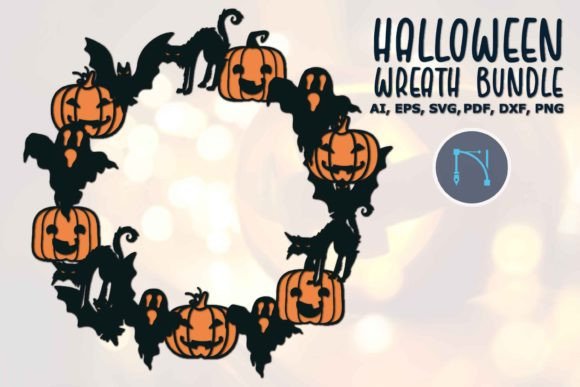
Transforming a flat digital file into a tangible, dimensional decoration requires both the right assets and a clear creative vision. The 3D Halloween Bat Ghost Pumpkin Wreath serves as a versatile foundation for crafters looking to move beyond standard vinyl decals. Unlike traditional wreath designs that rely solely on paint or fabric, this digital asset is engineered specifically for layering. It utilizes separate cut lines for bats, ghosts, pumpkins, and foliage, allowing makers to build depth through foam spacers, cardstock stacking, or shadow boxes. This structural approach turns a simple graphic into an immersive piece of seasonal decor that catches light and casts shadows, creating a genuinely spooky atmosphere.
The utility of this design lies in its comprehensive file ecosystem. While many creators focus exclusively on SVG files for cutting machines, having access to AI, EPS, DXF, PNG, and PDF formats ensures the design remains functional across different workflows. A small business owner might use the vector AI file to resize elements for large-scale window displays without pixelation, while a hobbyist uses the PNG for digital party invitations. Understanding how to leverage each format prevents technical bottlenecks and allows the creative process to flow smoothly from screen to physical product.
Mastering Dimensional Layering Techniques
Achieving a true 3D effect with the 3D Halloween Bat Ghost Pumpkin Wreath depends entirely on spacing and material contrast. When importing the SVG into software like Cricut Design Space or Silhouette Studio, treat each element as an independent component rather than a single welded image. The most effective method for depth involves using adhesive foam dots or strips between layers. Place the background foliage directly against the wreath base, elevate the pumpkins slightly, and position the bats and ghosts at the highest point. This hierarchy mimics natural perspective and prevents the design from looking flat even when viewed from an angle.
Material selection plays a critical role in defining the wreath’s character. For a rustic aesthetic, use textured cardstock or watercolor paper for the pumpkins and matte vinyl for the silhouettes. Conversely, glossy holographic vinyl for the ghosts combined with black glitter cardstock for the bats creates a modern, high-contrast look suitable for contemporary interiors. Experimenting with mixed media adds tactile interest that digital proofs cannot convey. Consider adding battery-operated fairy lights behind the top layer; the semi-transparent nature of certain papers and vinyls will allow the light to diffuse softly, enhancing the eerie ambiance after dark.
Adapting the Design for Commercial Products
For entrepreneurs and small business owners, this wreath design offers significant scalability. The inclusion of EPS and DXF formats means the artwork can be adapted for production methods beyond electronic cutting machines. Laser engravers can utilize the vector paths to etch the wreath design onto wood blanks, acrylic, or leather patches. The precision of these vector formats ensures that intricate details, such as the facial expressions on the ghosts or the ridges on the pumpkins, remain crisp regardless of the substrate. This opens revenue streams for sellers who want to offer durable, weather-resistant outdoor decorations that paper crafts cannot provide.
Print-on-demand applications also benefit from the high-resolution PNG and PDF files. The transparent background of the PNG allows for seamless integration onto apparel, tote bags, or mugs without needing complex masking. However, successful merchandising requires adaptation. A dense wreath design might need simplification for screen printing to reduce color counts and production costs. Use the Adobe Illustrator (AI) file to isolate specific elements—perhaps just the bat cluster or a single pumpkin—to create coordinating sets of smaller merchandise. This modular approach maximizes the value of a single digital purchase while offering customers variety.
Digital Applications and Content Creation
Not every project requires physical fabrication. Bloggers, social media managers, and educators can utilize the raster and vector formats to enhance digital content. The PNG format is particularly valuable for creating custom graphics for Pinterest pins, Instagram stories, or website headers. Because the background is transparent, designers can overlay the wreath onto branded templates or seasonal photography without obscuring underlying text or imagery. Maintaining visual consistency across platforms strengthens brand recognition during the competitive Halloween season.
Educators and community organizers can repurpose the PDF format for printable activities. The clean lines of the vector art make it ideal for coloring pages, scissor skills worksheets, or classroom door decorations. Since PDFs preserve formatting across devices, teachers can distribute these resources confidently, knowing they will print correctly on standard letter-sized paper. For digital marketers, the scalable nature of the SVG and EPS files ensures that promotional banners look sharp on everything from mobile screens to large-format event signage. Always verify licensing terms before selling finished products, but feel free to explore personalization options for client gifts or internal branding.
Technical Best Practices for Clean Results
Working with multi-layered 3D designs requires disciplined file management. Before sending the 3D Halloween Bat Ghost Pumpkin Wreath to your cutting machine, organize your canvas by grouping related elements. Label layers clearly within your software to avoid confusion during assembly. If you are modifying colors or sizes, do so in the original vector file (AI or EPS) rather than the SVG whenever possible. This preserves the mathematical integrity of the curves and prevents jagged edges that can occur when resizing rasterized imports. Consistency in line weight and style is essential for maintaining a professional finish.
Test cuts are non-negotiable for complex layered projects. Different materials require different blade depths, pressure settings, and mat types. A setting that works for 65lb cardstock may tear delicate vellum or fail to cut through glitter vinyl. Create a small test swatch containing one bat, one ghost, and one pumpkin segment to verify fit and adhesion before committing to the full wreath. Document your successful settings for future reference. This systematic approach reduces waste and frustration, ensuring that your creative energy is spent on assembly and styling rather than troubleshooting machine errors.
Styling for Various Environments and Audiences
The versatility of this wreath design allows it to transition between different stylistic niches. For a family-friendly porch display, opt for bright oranges, classic blacks, and friendly ghost expressions. Pair the wreath with hay bales and mums to create a welcoming harvest vibe. In contrast, for adult-oriented gatherings or haunted house props, shift the palette to desaturated purples, blood reds, and stark whites. Distressing the edges of the paper layers or applying tea stains can add an aged, antique quality that elevates the spookiness factor. Context dictates execution; always consider where the final piece will live and who will be viewing it.
Interior designers and home stagers can use the wreath as a focal point in vignettes. Scale matters significantly here. A 12-inch wreath may get lost on a grand entryway door but feels perfect for a nursery or powder room. Utilize the scalability of the vector files to adjust dimensions precisely for the intended space. When photographing your creations for portfolios or social media, pay attention to lighting direction. Side-lighting emphasizes the 3D texture and layers, whereas front-facing flash flattens the image. Capturing the wreath in situ helps viewers visualize its potential in their own homes, bridging the gap between digital inspiration and physical reality.
Ultimately, the 3D Halloween Bat Ghost Pumpkin Wreath is more than a seasonal decoration; it is a flexible design system. Whether you are cutting vinyl for a personalized gift, laser-engraving wooden signs for an Etsy shop, or designing digital assets for a marketing campaign, the provided file formats support diverse outcomes. Success comes from respecting the technical requirements of each medium while injecting your unique creative perspective. By balancing practical craftsmanship with imaginative application, you ensure that every project feels intentional, polished, and distinctly yours.